LG Instaview Refrigerator: A Homeowner's Fix & Maintenance Guide
Learn to diagnose and fix common LG Instaview refrigerator issues with clear, stepwise guidance from How To Refrigerator, including maintenance tasks and safety tips.


With this guide, you’ll learn to diagnose and address the most common LG Instaview refrigerator issues, from not cooling to ice maker problems. This quick answer outlines the essential steps and safety notes homeowners should know before beginning any repair. Expect practical, DIY-friendly instructions, recommended tools, and when to call a professional.
Understanding LG Instaview Refrigerator: Key Features and How They Work
The LG Instaview refrigerator series is built around a glass panel door that lets you peek inside without opening the door, helping to reduce cold air loss and save energy. Beyond the signature door, these models commonly include an integrated ice maker, a water dispenser, LED lighting, and an advanced cooling system designed to maintain humidity balance. A smart diagnostic system can alert you to issues via display codes or app notifications. For homeowners, the goal is to understand how these features interact and what routine maintenance they require to perform reliably. Regular care—such as coil cleaning, gasket inspection, and keeping vents clear—helps sustain efficiency and cooling performance over time. According to How To Refrigerator, familiarity with the basics of airflow, defrost cycles, and condensation control sets the stage for successful DIY fixes.
In practice, the Instaview’s energy-saving mode and smart features are most effective when the unit is properly leveled, has clean condenser coils, and a seal-tight door. When these conditions aren’t met, you may notice uneven cooling, frost buildup, or longer run times. By understanding how the refrigeration cycle works—compressor, condenser, expansion device, and evaporator—you can identify where a fault is likely to originate and apply targeted steps rather than guessing blindly.
This section helps you build a mental map of your LG Instaview’s components and how they should behave under normal operation. You’ll know what sounds are normal (a soft hum when the compressor starts, a gentle fan when doors are closed) and what might indicate a problem (frequent cycling, buzzing from the rear, or condensation around seals). Armed with this knowledge, you’ll approach repairs with confidence and avoid unnecessary part replacements.
In summary, your first move is understanding the role of key parts, then building a simple maintenance habit that keeps airflow intact, seals tight, and coils clean. The How To Refrigerator team emphasizes a practical, patient approach that minimizes risk while delivering reliable results.
Common Issues Homeowners See with LG Instaview Refrigerators
Homeowners commonly report a mix of cooling, ice-making, and door-sealing issues with LG Instaview refrigerators. Not cooling or warm compartments can be caused by poor airflow, a dirty condenser, or door seals that aren’t sealing properly. Frost buildup on evaporator coils can reduce efficiency and lead to longer run times. Water leaks from the dispenser or pooled moisture near the crisper can point to drainage or line issues. Ice makers may stall due to line kinks, clogged filters, or improper leveling. Door alarms and error codes are frequent signals that a component needs attention. While some problems are simple DIY fixes, others require professional service, especially when refrigerant components or sealed systems are involved.
To diagnose, start with simple checks: confirm the unit is plugged in and receiving power, verify the thermostat is set correctly, and inspect the door gaskets for cracks or warping. Then look for obvious blockages around vents and ensure there is no obstruction behind the unit that could affect airflow. If you notice frost on the back wall or frost on the ice maker, this could indicate a defrost issue or a clogged drain. By categorizing issues into cooling, ice, and leakage, you can apply the appropriate remedy quickly and safely.
Safe Troubleshooting: Safety Policies for DIY Repairs
Safety comes first when working on any appliance. Always unplug the refrigerator before starting any inspection or maintenance. If your model has an ice maker or water line, shut off the water supply and avoid applying heat to electrical components. Use insulated gloves when handling exposed metal parts and avoid touching sharp edges. Do not bypass safety devices or jump-start electrical circuits; sealed systems can be dangerous to repair without proper training. If you encounter refrigerant smells, unusually loud noises from the compressor, or if the unit’s temperature remains unsafe after basic checks, stop and call a qualified technician. How To Refrigerator recommends keeping a clear workspace, using a resource checklist, and never attempting refrigerant-related work yourself unless you’re a licensed professional.
When performing cleaning tasks, always use non-abrasive cleaners and soft cloths. Avoid spraying cleaning solutions directly into vent areas or control panels. If moisture enters electronics, dry completely before reconnecting power. These precautions help prevent electric shock, water damage, and accidental component injury. By following safety guidelines, you reduce risk while you troubleshoot effectively.
Preventive Maintenance Routine for Longevity
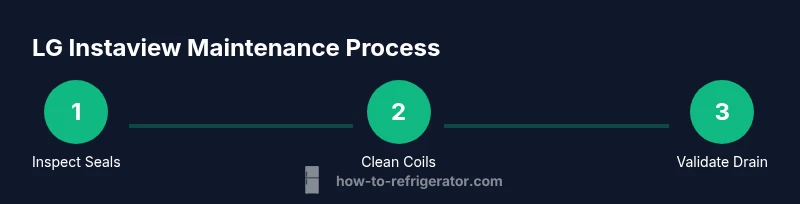
A proactive maintenance plan keeps LG Instaview refrigerators running efficiently and reduces the likelihood of major repairs. Start with a quarterly routine: (1) Clean the condenser coils (located typically beneath or behind the unit) using a soft brush or vacuum to remove dust and debris. Clean coils improve airflow and reduce energy consumption. (2) Inspect door seals for cracks or gaps and replace gaskets that don’t seal properly to prevent warm air intrusion. (3) Wipe interior surfaces, shelves, and door racks to prevent sticky residue that can attract pests or degrade airflow. (4) Check the defrost drain for blockages and flush if needed to prevent standing water. While performing maintenance, note any unusual noises or refrigerant smells and schedule service if needed. Routine care protects performance and prolongs the life of the appliance.
In addition to these tasks, ensure the fridge is level for proper door alignment and that there is adequate clearance around the back and sides for heat dissipation. A well-ventilated unit cools more evenly and uses less energy. The goal of this maintenance routine is not only to fix issues but to prevent them from arising in the first place. Regular checks on coils, seals, and drainage are simple steps that yield long-term benefits.
The How To Refrigerator team recommends logging maintenance activities in a simple notebook or digital reminder so you don’t miss intervals or tasks. This habit helps homeowners stay on top of issues before they escalate into costly repairs.
Not Cooling? Quick Diagnostics You Can Try
If you notice not cooling in your LG Instaview refrigerator, start with a structured, safe diagnostic. First, verify the unit is plugged in and receiving power at the outlet (test the outlet with a lamp). Next, confirm the thermostat setting isn’t accidentally lowered and that the door is fully closed. Look for blocked vents inside the fridge that prevent cold air from circulating to all shelves. Inspect door gaskets for wear and clean them to ensure an airtight seal. Listen for the evaporator fan—if it’s unusually loud or silent, this could indicate a fan or motor issue. If frost buildup appears on the back panel or in the freezer, a defrost issue may be present. Finally, check the condensate drain and defrost cycle to ensure ice isn’t blocking the airflow. If these steps don’t resolve the problem, contact a professional for a more in-depth inspection.
Not cooling often stems from airflow problems or a failed defrost cycle. By methodically checking each suspect area, you can narrow down the root cause without unnecessary part replacements and decide whether a service call is warranted.
Step-by-Step Cleaning and Coil Care (Overview)
This section provides a clear, non-technical overview of a routine cleaning and coil care process. It’s designed to prepare you for the detailed steps in the dedicated STEP-BY-STEP block. Begin by unplugging the unit and removing all loose items from shelves. Gently wipe interior surfaces with a mild, non-abrasive cleaner and a soft cloth to remove spills and residues that can harbor bacteria. Next, access the condenser coils (usually under the front or back panel) and carefully remove dust with a brush or vacuum designed for delicate components. After cleaning, reattach any panels and plug the unit back in. Finally, re-evaluate door seals, verify proper leveling, and test a brief cooling cycle to confirm the unit returns to the correct temperature. Regular cleaning helps maintain efficiency and extends the life of your LG Instaview refrigerator.
When to Replace Components and Seek Service
Some issues require professional repair or component replacement rather than DIY fixes. If you notice refrigerant smells, persistent cooling failure after basic troubleshooting, unusual noises from the compressor, or visible damage to the sealed refrigeration system, contact a licensed technician. Electrical components and refrigerant handling carry safety risks that aren’t appropriate for casual at-home repairs. In many cases, technicians can perform precise leak checks, evacuations, and recharge procedures that aren’t safe to attempt yourself. If the model is under warranty, consult the manufacturer’s guidance before performing any disassembly. The goal is to preserve safety and avoid voiding coverage while getting back to reliable cooling quickly.
For prevention, keep maintenance logs and address small issues promptly before they become costly failures. Regular professional service can extend the life of your LG Instaview refrigerator and maintain energy efficiency over time.
Energy Efficiency and Smart Features Care
Energy efficiency is a practical benefit of regular maintenance. Clean coils, seals, and vents support better airflow and lower running costs. The Instaview’s energy-saving features perform best when the door is sealed and the internal environment remains stable. For smart features, keep the software up to date if your model supports updates, and monitor any diagnostics reported by the control panel. If you rely on advanced features like remote monitoring, ensure your network is secure and the app is kept current. A clean, well-tuned unit not only saves energy but also minimizes wear on components, helping you enjoy consistent performance and lower operating costs over the appliance’s lifetime.
Tools & Materials
- Screwdriver set(Phillips head #2 and flathead for panel screws on most models)
- Soft cloths(Non-abrasive; for interior cleaning)
- Mild cleaning solution(Non-ammonia, non-acid cleaner; avoid spraying into vents)
- Vacuum with brush attachment(For dust on condenser coils and behind panels)
- Gloves(Protect hands from sharp edges and cold surfaces)
- Multimeter (optional)(Test electrical outlets and some sensor circuits)
Steps
Estimated time: 60-90 minutes
- 1
Power down and unplug
Unplug the refrigerator from the wall to ensure you won’t receive shocks or accidentally operate moving parts during inspection. This is the first, most important safety step. If your model has a water line, shut off the valve to prevent leaks.
Tip: Always unplug before touching electrical components; use a non-contact tester to verify no live voltage remains. - 2
Check door seals and alignment
Inspect door gaskets for cracks or gaps and test the seal by closing the door on a piece of paper or a dollar bill; if it slides out easily, the seal isn’t airtight. Realign the door if it isn’t closing evenly to prevent warm air intrusion.
Tip: Clean gaskets with a mild soapy solution and dry thoroughly to restore seal integrity. - 3
Inspect condenser coils
Locate the condenser coils (often beneath or behind panels). Use a soft brush or vacuum to remove dust and debris that impair heat transfer. Reconnect panels securely after cleaning.
Tip: Dirty coils can dramatically reduce cooling efficiency and cause longer run times. - 4
Test ice maker and water dispenser
Check the ice maker for jams or ice buildup and ensure the water line isn’t kinked. If the ice maker is slow or noisy, inspect the fill tube and filter (if applicable).
Tip: If your model uses a water filter, replace it per the manufacturer’s recommended schedule. - 5
Reset the control panel
Sometimes a simple reset resolves transient interface glitches. Power down for a few minutes, then power back on and re-enter your temperature settings.
Tip: Note current temperature targets before resetting to restore your preferred settings. - 6
Test cooling cycle and monitor
Close all doors, replug, and set temperatures to recommended levels. Give the unit 2–4 hours to stabilize and verify even cooling across shelves.
Tip: If temperature targets aren’t met after several hours, schedule service to inspect for refrigerant or sensor issues.
FAQ
What is the most common LG Instaview issue homeowners face?
Not cooling or temperature inconsistency is the most frequent concern. Often this stems from airflow blockages, dirty coils, or sealing problems. A systematic check of seals, airflow vents, and coils usually resolves the issue.
Not cooling is usually caused by airflow or seal problems; start with seals and coils, then check airflow.
Do I need professional service for lg instaview repairs?
Some problems, like refrigerant leaks or compressor failures, require a licensed technician. For simple tasks such as cleaning coils or replacing a damaged gasket, a homeowner can do it with proper safety precautions.
For refrigerant or compressor issues, call a professional; for coil cleaning or gasket replacement, you can DIY safely.
How often should I clean the condenser coils?
Coil cleaning frequency depends on usage and environment. In dusty or high-traffic kitchens, clean coils every few months; in clean environments, a semiannual clean is usually sufficient.
Clean coils every few months if your kitchen is dusty; otherwise, twice a year is a good rule of thumb.
Can I reset the ice maker myself?
Yes. If ice production slows or stops, try a reset by unplugging for a few minutes, then re-plug and test. If issues persist, check the line and filter.
Unplug for a few minutes, plug back in, and test ice production; if needed, check lines and filters.
What if the display shows an error code?
Refer to the user manual or LG support site for your model’s specific error codes. If a code signals a refrigerant or sensor issue, contact service promptly.
Check the manual or LG support site for the exact code meaning; some codes require professional help.
Is Instaview energy efficiency affected by door handling?
Yes. Frequent door openings and improper sealing reduce efficiency. Use the Instaview window to minimize door openings and ensure doors close properly.
Less door opening means better energy efficiency; always ensure the doors seal well.
Watch Video
Top Takeaways
- Identify root cause before replacing parts
- Keep coils and gaskets clean for efficiency
- Unplug before any inspection and avoid refrigerant work
- Use a structured plan to diagnose not-cooling and leak issues