How to Filter Refrigerator: Replace Your Water Filter with Confidence
Learn how to replace your refrigerator water filter with confidence. This guide covers locating the filter, choosing the right replacement, installation, purging air, resetting indicators, and maintenance to ensure clean, great-tasting water and ice.


You're about to learn how to filter refrigerator water filters correctly and safely. This quick guide will help you locate the filter, choose the right replacement, install it properly, purge air, and reset indicators. With the right tools and a few careful steps, you can restore clean water and ice from your fridge, avoid leaks, and extend the life of your appliance. How To Refrigerator has your back with expert, homeowner-friendly instructions.
What a refrigerator water filter does
A filter fridge uses is designed to remove contaminants from the water that flows to your ice maker and dispenser. The primary goal is to improve taste and odor, but it also reduces chlorine and other soluble substances that can affect how your water and ice taste. In most homes, the filter is a replaceable cartridge inside the refrigerator and works by passing water through an activated carbon media, which captures impurities as water flows through. Regularly replacing the filter helps ensure optimal performance and the best possible water quality. When you start a project to filter refrigerator water filters, you’re taking a small step that yields big rewards: healthier, better-tasting water and ice, reduced scale buildup in the dispenser, and less risk of contamination in your drinking supply. The instructions below come from How To Refrigerator and reflect typical homeowner best practices.
How to identify filter location in your fridge
The location varies by model. Some units conceal the filter behind a grille at the base, others mount it inside the fresh food compartment near the ice maker, and a few tuck the cartridge in the rear cabinet. Start by checking your fridge’s user manual or model sticker on the inside wall. Look for terms like ‘Water Filter’, ‘Filter Cartridge’, or a visible arrow indicating the filter housing. Once you know where the filter sits, verify the exact replacement you need by matching the part number on the old cartridge or by using the model number printed on the fridge. This step ensures you buy the correct filter for your specific machine rather than guessing. When you filter refrigerator water filters, compatibility matters for performance and seal integrity. If in doubt, contact the manufacturer’s support line or refer to How To Refrigerator’s troubleshooting guides.
Filter types and compatibility: what you need to know
There are several common refrigerator filter types, often sharing the same end goal: clean, safe water. Most home units use activated carbon filters, sometimes combined with a fine micron membrane for additional contaminants. Some models use inline filters that connect to the water supply line. Another consideration is certifications; look for NSF/ANSI standards on the packaging. Compatibility is the key: using the wrong filter can reduce water flow, affect taste, or damage the housing. If you’re unsure, remove the old filter and compare its shape and size, or run a manufacturer lookup using your fridge model. The goal is to choose a filter whose cartridge type, threading, and gasket design match your unit. As you proceed, remember that the filter’s job is not to remove every contaminant but to reduce common substances that impact flavor and safety. How To Refrigerator emphasizes matching filter media to your specific appliance.
Tools and safety before you start
Prepare a clean workspace and gather the right tools. You’ll typically need replacement filter, a clean cloth or towel, a small bowl or cup to catch drips, and mild dish soap for quick cleanup. Some models require only your hands, while others benefit from a simple pair of pliers (none essential for most consumer filters). Turn off the water valve to the fridge and unplug the unit if you’re comfortable, especially if you’ll be handling any electrical panels or doors. Place towels under the work area to protect the floor from moisture. Wipe the filter housing with a damp cloth after removal to remove any residue. This preparation reduces mess and helps you complete the job faster and with less risk to the appliance.
Step-by-step: removing the old filter
First, locate the filter and confirm it’s the correct cartridge for your model. Turn the housing counterclockwise until it stops, then pull the old filter straight out. Expect some water drips, so keep your towel handy. If the filter sticks, do not force it; check for a release tab or alternate release method in your model’s manual. Clean the housing threads with a cloth, removing any mineral buildup. After removal, inspect the seal and gasket; replace any damaged parts before installing a new cartridge. This step minimizes leaks and ensures a proper seal when the new filter is inserted.
Step-by-step: installing a new filter
Remove the new filter from its packaging and remove any protective caps. Align the filter with the housing by matching the arrows or threading pattern. Insert slowly and rotate clockwise until you feel it seat, then give it a gentle twist to lock. Re-seat the housing cover if your model requires it. Before returning to service, wipe away any remaining moisture and check that the filter is fully engaged. If your fridge includes a water flow indicator, ensure it’s not blocked and that the cartridge is properly oriented. This careful installation is essential to avoid leaks and to maintain water pressure.
Step-by-step: purging air and testing water flow
With a new filter in place, restore the water supply and run water through the dispenser or ice maker. Allow water to flow for several minutes, or until it runs clear and any air bubbles have dissipated. Collect a sample in a glass to check taste and odor. If you notice a sulfur or chlorine taste, flush longer. Should you see leaks around the housing, power off and recheck the filter alignment and seal. This purging step is critical to remove air and any residual manufacturing particles and to ensure optimal filtration performance.
Step-by-step: resetting the filter indicator light (where applicable)
Some refrigerators include a filter life indicator or a reset button. After replacing the cartridge, follow your model’s instructions to reset the indicator. In many cases, you’ll press and hold the reset button for several seconds or navigate through the settings menu. If your unit doesn’t have a reset option, the indicator will return to normal once the system completes its default test cycle in the next few uses. Keeping the indicator current helps you know when your next replacement is due.
Maintenance, signs, and replacement timing
A key part of filter maintenance is knowing when to replace. Signs include reduced water flow, visible sediment in the water, or a persistent odd taste or odor. Manufacturer guidelines vary, so always check the packaging and your fridge’s manual. How To Refrigerator analysis shows that following the recommended replacement interval helps maintain water quality and appliance performance. Establish a routine, such as inspecting the filter cartridge at regular intervals and replacing it before flow slows noticeably. Keeping a spare filter on hand minimizes downtime and ensures you don’t have to postpone ice and water service.
Troubleshooting and disposal tips
If the water suddenly tastes off or there’s limited flow, recheck the filter installation, gasket integrity, and the water supply valve. Ensure there are no kinks in the supply line and that the filter is fully seated. If the issue persists, consider replacing the cartridge again or consulting the fridge manufacturer for model-specific guidance. Dispose of used filters according to local regulations; many filters are recyclable when drained and cleaned per the packaging directions. Regular replacement reduces the risk of bacterial growth and ensures safe drinking water from your filter refrigerator. By taking these steps, you’ll keep your appliance running and your water tasting fresh.
Tools & Materials
- Replacement refrigerator water filter (model compatible with your unit)(Select exact model from fridge manual or model number)
- Cleaning cloth or towel(To catch drips and wipe seals)
- Mild dish soap and warm water(For quick cleanup of housing exterior and surfaces)
- Paper towels or clean rag(For cleanup during and after procedure)
- Gloves (optional)(Protect hands during replacement)
- Small container to collect drips (optional)(Useful for catching water during purge)
Steps
Estimated time: 15-20 minutes
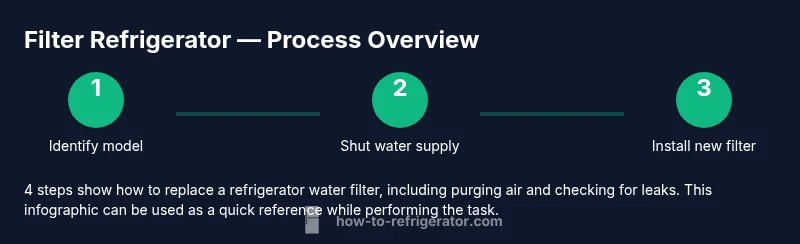
- 1
Identify and verify compatibility
Locate the filter model for your fridge, confirm the cartridge type, and verify the correct replacement. Look for the model number on a label inside the fridge and cross-check it with the filter packaging. This ensures you don’t buy the wrong cartridge and avoids leaks or reduced filtration performance.
Tip: Double-check arrows on the filter to ensure proper orientation; misalignment can cause leaks. - 2
Shut off water supply
Turn off the water valve feeding the fridge to prevent drips during removal. If you can’t locate a valve, use towels and prepare for minor water release.
Tip: Having a towel ready avoids a wet mess and protects the floor. - 3
Remove the old filter
Twist the filter housing counterclockwise until it stops, then pull the cartridge straight out. Expect some water to drip; have towels ready. If it sticks, do not force it—check for a release tab or alternative release mechanism in your model’s manual.
Tip: Inspect the gasket and housing for wear; replace if damaged. - 4
Prepare the new filter
Unpack the new filter and remove any protective caps. If your model requires priming, run a quick rinse under clean water to saturate the media before installation.
Tip: Keep packaging handy for reference on installation direction. - 5
Install the new filter
Insert the new cartridge into the housing and turn clockwise until it locks in place. Make sure it sits evenly and the gasket seals cleanly. Reassemble any cover or door panels as needed.
Tip: Avoid overtightening; a snug fit is sufficient to seal. - 6
Purge air and test water flow
Turn the water back on and run water through the dispenser to purge air. Let it flow for several minutes or until the water runs clear and free of air bubbles. Check for leaks around the housing and confirm normal water pressure.
Tip: If leaks appear, power off and reseat the filter carefully.
FAQ
Do I need to unplug the fridge before changing the water filter?
In most cases you can replace the water filter with the fridge powered, but it’s safer to unplug if you’re dealing with exposed wiring or panels. Always consult your model’s manual.
If you’re touching electrical parts, unplug the fridge first. Otherwise, you can replace the filter with reasonable caution.
How often should I replace a refrigerator water filter?
Follow the manufacturer’s guidelines for your model. Replacement timing depends on usage, water quality, and whether you see a change in taste or flow.
Check the maker’s schedule for best results; replace when indicated or if water flow slows.
What if there’s no visible filter location?
Consult the fridge manual or search by model number online. Many fridges hide the filter behind a grille, inside the door, or at the back.
Look up your model and follow the model-specific steps.
Can I reuse a filter after cleaning?
No. Refrigerator water filters are designed for single use and should be replaced with a new cartridge.
Filters aren’t reusable; replace with a fresh cartridge.
Is it safe to drink water immediately after replacement?
Yes, once you’ve purged air and the water runs clear, it’s safe to drink. Taste may improve after flushing longer if needed.
Run it until it tastes right and is free of air.
How do I reset the filter indicator light?
Follow your fridge’s instructions; many models require holding a reset button or navigating through the settings menu.
Open the settings and use the reset option as described in your model’s manual.
Watch Video
Top Takeaways
- Identify the correct filter model before purchase.
- Install with proper orientation to prevent leaks.
- Purged air until water runs clear.
- Reset indicators if your fridge supports it.
- Dispose of used filters per local guidelines.