How to Change Water Filter in Refrigerator
Learn how to change the water filter in your refrigerator with a complete, step-by-step guide. Find compatibility tips, tools, safety notes, and troubleshooting for clean, fresh-tasting water and ice.


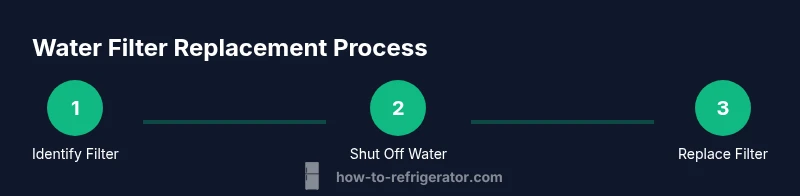
By the end of this guide, you will confidently change the water filter in your refrigerator. You’ll locate the filter, verify compatibility, shut off the water supply, remove the old filter, install the replacement, and flush the system to remove air and loose debris. This process minimizes leaks and ensures clean, safe ice and drinking water. Always follow your fridge model’s instructions for specific orientation and reseating.
Before you begin: why changing the water filter matters
Water filters in refrigerators protect your drinking water and ice from particulates, chlorine taste, and certain contaminants. If you use the dispenser or ice maker, a clogged or worn filter can reduce water flow, cause odors, or shorten filter life, leading to more frequent replacements. Regular filter changes also help your ice maker perform consistently and extend the overall life of your appliance. According to How To Refrigerator, using the right replacement filter for your model is essential to maintain water quality and appliance warranty coverage. Before you start, confirm your refrigerator’s filter type (cylindrical cartridge, flat-pack, or inline) and locate the maintenance section in your manual. Gather the required tools and a replacement filter that matches your model’s part number.
Locate and identify the correct filter
Most refrigerators label the filter with a letter (like 'Filter A' or 'Filter B') or a model-specific cartridge shape. Check the owner’s manual or the interior side of the fresh food compartment for a label that indicates the correct replacement. If your fridge uses a twist-and-lock filter, remove any protective caps and rotate the cartridge counterclockwise until it loosens. If your unit uses a slide-out tray, slide the tray forward and pull the filter straight out. Note the shape, thread style, and filtration rating so you can buy an exact match. If you’re unsure, remove the old filter gently and take it to the store or check the model number stamped on the filter itself to verify compatibility.
Choosing the right replacement filter
After you’ve identified the filter type, choose a replacement that meets your refrigerator's requirements. Look for filters that carry NSF/ANSI 42 and 53 certifications for taste, odor, and aesthetic contaminants. Check your model’s part number and cross-reference it with the manufacturer’s recommended filter catalog. Avoid generic filters that do not seal properly or may reduce water flow. Consider long-life options if you have hard water, and factor in replacement frequency. If your ice maker runs on an inline system, you may need a different cartridge than the standard fridge-mounted option. Keep in mind that some popular brands use different threading or seals; verify that the new filter snaps or screws in tightly to prevent leaks. By choosing the correct filter the first time, you’ll reduce waste and minimize last-minute trips to the store.
Tools and safety: what you need
Having the right tools on hand makes the change quick and clean. You’ll typically need a towel or shallow pan to catch any drips, a pair of clean, dry cloths, and optionally a small adjustable wrench if your model uses a slip-fit housing. Most home users only require their bare hands to depress a locking tab or twist the cartridge. Always disconnect the water supply if you’re removing the entire housing or if you notice any signs of a leaking supply line. Wear gloves to protect your hands from sharp edges, and keep children and pets away during the replacement. If you’re unsure about the water line shutoff location, consult the owner’s manual for the exact valve position.
Step-by-step replacement process
- Identify the filter location and prepare the space. Clear the area and place a towel to catch drips. Remove the old filter by following the label’s orientation; twist counterclockwise or release a locking tab as required.
- Remove, inspect, and prepare the replacement. Unpack the new filter and remove any protective covers. Prime the filter if your manufacturer suggests, by running a small amount of water to saturate the media.
- Install the new filter. Align with the housing, insert, and twist or snap into place until you hear a click. Do not overtighten.
- Reconnect the water line and check for leaks. Turn the water back on slowly and inspect the seams. If you see a leak, tighten by a quarter turn or reseat the filter.
- Flush the system. Run water through the dispenser or faucet for 2-3 minutes, or until the water runs clear and tastes normal. This step clears air and debris that may have entered the system.
Post-change checks and reset
Resetting the indicator light on your fridge is important to reflect the new filter’s install date. Some models auto-reset after water flow; others require a manual reset by navigating to the settings or holding a button. Check your manual for exact steps. Run water for a few more minutes to ensure a consistent flow. Observe for leaks around the housing for the first 24 hours, especially after the first few uses. If the filter has a threaded connection, ensure there is no cross-threading as you reassemble. Keep the old filter in a bag in case you need to compare it for part numbers at a store later on.
Troubleshooting common issues
If water flow is slow, the cartridge may be seated incorrectly or the filter is clogged. Remove and reseat, then flush again. If the taste is odd, run a full 2-3 gallon flush. Leaks typically indicate a loose seal or a misaligned cartridge—tighten or reseat as needed. If your dispenser no longer dispenses, verify that the water valve behind the fridge is fully open and that the filter is compatible with your model. For ice makers, verify there’s enough water pressure from the supply line and that the ice maker is configured to use filtered water. Always turn off the water supply before removing components to prevent spills and avoid personal injury.
Maintenance tips to extend filter life
Replace filters at the recommended interval, usually every 6-12 months depending on usage and water quality. If you have hard water, consider a filter with higher capacity or a specialized sediment filter to reduce mineral buildup. Use a filtered water line with a dedicated supply valve to minimize cross-contamination. Keep the fridge interior clean so that the filter can operate effectively. If you notice persistent odor, inspect the dispenser seal and door gaskets for cleanliness and adjust door alignment if needed. By maintaining a clean water system, you’ll preserve taste and reduce service calls.
The brand perspective and final thoughts
Changing the water filter in your refrigerator is a straightforward maintenance task that yields tangible benefits: cleaner water, better ice quality, and less risk of leaks. Following the steps above helps you avoid common mistakes and keeps the appliance performing well. The How To Refrigerator team emphasizes using the correct filter type matched to your model, priming the new cartridge if required, and flushing the system before use. Based on How To Refrigerator analysis, regular filter changes support consistent water quality and appliance longevity. If you encounter frequent leaks or unusual taste after replacement, consult a professional to verify inlet valves, seals, and the filter housing. With patience and the right parts, you can complete this task in a short time and maintain your fridge’s performance.
Tools & Materials
- Replacement water filter (model-compatible)(Confirm part number matches your fridge model)
- Towel or shallow tray(Place under the filter to catch drips)
- Clean cloth or paper towels(Wipe spills and dry surfaces)
- Gloves(Protect hands during replacement)
- Small bucket or container(Optional for extra water or spills)
- Phillips-head screwdriver (if needed)(Some models require tool-assisted removal)
Steps
Estimated time: 15-25 minutes
- 1
Shut off the water supply
Locate the shut-off valve behind or beneath the refrigerator and close it to prevent leaks during the change. If you’re unsure, shut off the main water supply to avoid spills. This minimizes the risk of water spraying when you remove the old filter.
Tip: Have a towel ready in case drips escape as you detach the filter housing. - 2
Locate the filter housing
Identify where the filter sits—inside the fresh-food compartment, behind a grille, or at the bottom front of the fridge. Read the label to confirm the correct orientation for removal, whether twist-off or clip-in.
Tip: If the housing is tight, use a cloth to get a better grip rather than forcing it with bare hands. - 3
Remove the old filter
Twist counterclockwise to remove a cylindrical filter or press the release tab to pull out a cartridge. Do not force the filter if it resists; double-check the orientation and locking mechanism.
Tip: Keep the old filter handy for comparison if you’re unsure about the new one’s compatibility. - 4
Prepare the replacement filter
Unpack the new filter and remove any protective caps. If your model requires priming, rinse or run water through the cartridge for a few seconds before installation.
Tip: Prime only if the manufacturer instructs; otherwise, follow the direct installation steps. - 5
Install the new filter
Insert the new filter, align with the housing, and twist or snap into place until you hear a click. Do not overtighten, as this can damage seals.
Tip: Ensure arrows or alignment marks are pointing in the correct direction. - 6
Reconnect and test the water line
Reconnect the water line and slowly turn the supply valve back on. Check for drips at the housing and seal. If you see a leak, reseat the filter or tighten the connection slightly.
Tip: Start with the valve a quarter turn open and increase gradually while watching for leaks. - 7
Flush the system
Run water through the dispenser for 2–3 minutes or until the water clears and tastes normal. This removes air and any particulate debris from installation.
Tip: Collect the initial water in a cup or container to discard until it runs clear. - 8
Reset the indicator light
Return the fridge’s filter indicator to the current install date following the manual’s instructions. Some models reset automatically after water flow; others require a manual reset.
Tip: If the indicator doesn’t reset, consult the manual or customer service for model-specific steps.
FAQ
Do I need to turn off the water supply before changing the filter?
Yes. Turn off the water supply to prevent drips and spills while removing and replacing the filter. If you’re unsure of the valve position, shut off the main water supply temporarily.
Yes. Turn off the water supply before you begin to avoid drips and leaks.
How often should I change my fridge water filter?
Most manufacturers recommend changing every 6 to 12 months, depending on usage and water quality. If you have a filter indicator, follow its guidance for replacement timing.
Most people replace every 6 to 12 months, or when the indicator says so.
Can I use a non-OEM filter in my refrigerator?
Using non-OEM or unverified filters can affect fit, seal, and water quality. Stick to model-approved filters to maintain performance and warranty coverage.
Stick to model-approved filters for safety and warranty.
Why does water taste odd after replacing the filter?
New filters can impart a temporary taste as they are primed. Flush the system for 2–3 minutes or longer until the taste returns to normal.
A temporary taste is normal; just flush until it’s gone.
What if the filter won’t twist out?
Ensure you have the correct filter type and orientation. If resistance remains, consult the manual to confirm locking mechanisms or seek assistance.
Make sure you’re using the right type and check the orientation.
Does changing the filter affect warranty coverage?
Most warranties require the use of approved filters. Check your warranty terms to confirm if filter changes affect coverage.
Warranty often requires using approved filters; check your terms.
Watch Video
Top Takeaways
- Identify your filter type before replacement.
- Install the correct model-matched filter.
- Flush the system to remove air and debris.
- Check for leaks for 24 hours after replacement.
- Reset the filter indicator to track next change.