Refrigerator Display Case Repair Guide
Learn to diagnose and fix common refrigerator display case issues—cooling faults, frost buildup, drainage problems—with safe, step-by-step guidance for homeowners.


Goal: Fix common issues with a refrigerator display case, such as not cooling, frost buildup, or foggy glass. This guide walks you through safe diagnosis, typical fixes, and when to replace components. Gather basic tools, unplug before work, and follow step-by-step instructions to restore performance without risking damage. This quick start helps homeowners decide whether to DIY or call a pro.
What is a refrigerator display case and why it matters
A refrigerator display case is a specialized appliance designed to keep perishable items cold while showcasing them behind a glass front. In homes, it can appear as a large, freestanding unit or as a built-in section of a kitchen that resembles a display fridge used in groceries. Understanding its key purpose helps homeowners spot issues early. The How To Refrigerator team notes that display-case performance hinges on clean coils, proper door seals, balanced airflow, and an unobstructed drainage path. When any one of these elements falters, you may notice uneven cooling, condensation on the glass, frost accumulation, or excess ice buildup.
Common issues fall into a few buckets: a not-cooling symptom (the coolest parts of the interior feel warm), a not-defrosting symptom (frost or ice around the evaporator), a door that won’t seal (cold air leaks), and a drainage problem that causes water pooling or foggy glass. Most problems originate from simple maintainable causes like a dirty coil, stretched gaskets, or a clogged defrost drain. Fixes range from routine cleaning and seal replacement to more involved steps like testing the thermostat or diagnosing a failed defrost timer. The goal is to restore reliable cooling while preventing food spoilage.
According to How To Refrigerator, starting with a safety-first mindset and learning the layout of your display case saves time and reduces risk. With the right tools and a clear plan, homeowners can identify many issues without professional service, saving money and extending the life of their appliance.
Key components you should know
A refrigerator display case relies on a few core parts to regulate temperature, manage airflow, and protect contents. The compressor circulates refrigerant, the condenser coils release heat, and the evaporator coil absorbs heat from the interior. Fans move air across those coils, while the thermostat and defrost timer regulate when cooling turns on and frost is cleared. Door seals (gaskets) keep cold air inside, and the defrost drain and pan collect condensate and meltwater. All these elements work together; a fault in one can cascade into several symptoms, so understanding their roles helps narrow down causes quickly.
Regular checks help: inspect seals for cracks or gaps, wipe coils with a brush or cloth, and ensure the drainage channel is clear. If you notice frost around the evaporator, or water pooling, that often points to defrost or drainage issues. As a homeowner, you don’t need to be an appliance expert to perform these checks, but you do need a safe, methodical approach and the right tools.
Temperature control and airflow basics
Successful cooling relies on balanced airflow and accurate temperature control. The display case architecture is designed to move cool air from the condenser through ducts and over shelves, then pull warmed air out through the evaporator. When airflow is blocked by dust, ice buildup, or obstructed vents, cold air pockets form and other areas become warmer. A tired thermostat or failing fan can prevent the system from starting, leading to inconsistent temperatures and spoiled contents. Keep interior vents clear of groceries, bins, or packaging, and confirm that fans spin freely when the unit runs. If you hear unusual noises or feel airflow inconsistencies, these are often early signals of airflow problems that are inexpensive to fix with cleaning or replacement of a worn component.
Common failure modes and quick checks
Not cooling: check the thermostat setting, verify the compressor runs, and listen for the fans. Frost or ice buildup on the evaporator indicates defrost issues or a clogged drain. Foggy glass and excess condensation point to high humidity or a failed door seal. Water pooling around the base can signal a blocked defrost drain or a disconnected drain hose. Each symptom has a simple first-step: confirm power, inspect seals, clear vents, and empty the drainage path. If the problem persists, it’s time to proceed with deeper diagnostics or call a professional. Remember, safety matters—unplug before touching electrical components and avoid contact with refrigerant.
Safe diagnostic and disassembly steps
Begin with safety: unplug the unit, remove foods, and set up a dry workspace. Inspect door seals for cracks or gaps and replace if needed. Clean condenser coils with a brush or soft cloth to remove dust; dirty coils reduce efficiency and may overheat the compressor. Check the defrost drain for clogs and clear with a flexible pipe cleaner or a small amount of warm water. If you access electrical components, photograph wire positions before disconnecting connectors, label wires, and avoid pulling on wires. When tightening screws, use the correct driver size to prevent stripping. If you must remove panels, work slowly and keep track of fasteners. After reassembly, plug in and monitor performance for a full cycle to confirm the fix.
Symptom-driven troubleshooting guide
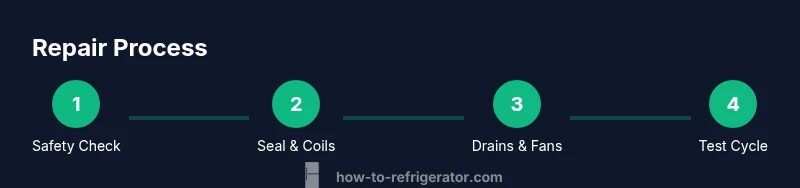
Not cooling clearly improves with thermostat adjustment but remains warm inside. Not defrosting shows frost near the evaporator and a pool of meltwater. Not sealing means visible air leaks at the door gasket and around the frame. Condensation or fogging indicates humidity or door seal issues. For each symptom, perform the corresponding checks in the order listed: safety first, then seals, then coils, then drains, and finally thermostat and fans. This methodical approach minimizes unnecessary parts replacement and preserves your display case’s life.
Maintenance routines to prevent future failures
Establish a simple maintenance cadence: clean the condenser coils every few months, inspect and replace door seals yearly or as needed, and ensure drainage paths are clear. Wipe down interior surfaces and shelving to remove spills that can shorten seal life or invite mold growth. Keep the ambient area around the display case clean to improve ventilation and reduce dust entry. If you live in a humid environment, consider a desiccant in the storage area behind the display to limit moisture. The How To Refrigerator team recommends documenting any recurring symptoms to detect patterns early and plan maintenance around those patterns.
Authority, next steps, and consumer tips
This guide provides practical, homeowner-friendly steps to diagnose and fix many fridge display-case issues. For more detailed diagnostics, consult external sources and consider service if you encounter refrigerant handling or electrical concerns. The How To Refrigerator analysis shows that proactive maintenance reduces costly repairs and extends appliance life. When in doubt, prioritize safety and seek professional help for complex electrical or refrigerant problems. Two to three external references below can help you understand energy considerations and safety standards.
Authority notes and sources: Local safety guidelines, energy-efficiency suggestions, and consumer protection recommendations can help you evaluate repairs and replacements responsibly.
Authority sources
- External sources provide context for safe operation and energy efficiency. Two to three credible references can help homeowners verify best practices.
- https://www.energy.gov/eere/buildings/articles/refrigerators-and-freezers
- https://www.osha.gov/
- https://www.cpsc.gov/
Tools & Materials
- Safety gear (safety glasses and gloves)(Protect eyes and hands during cleaning and disassembly)
- Multimeter(Test continuity on thermostat circuits and control panels)
- Screwdriver set (Phillips and flat-head, assorted sizes)(Remove access panels without stripping screws)
- Brush or coil-cleaning brush(Loosen dust from condenser and evaporator coils)
- Flashlight or headlamp(Inspect hard-to-see corners and drainage channels)
- Towels or absorbent mats(Contain spills and prevent slips)
- Bucket and catch pan(Collect condensate and defrosted water safely)
- Non-conductive plastics/wooden pry tool(Use instead of metal tools near coils)
Steps
Estimated time: 60-120 minutes
- 1
Prepare and safety-check
Unplug the display case, remove food, and lay towels to catch spills. Photograph internal wiring before touching any connectors. Gather tools and set a clear work area.
Tip: Label any wires or connectors to simplify reassembly. - 2
Inspect door seals
Check gaskets for cracks, tears, or warping. Press around the door frame to detect air leaks. Replace damaged seals to restore cold air containment.
Tip: Warm soapy water can help you identify leaks around the gasket. - 3
Clean condenser coils
Dust and debris on coils impede heat rejection. Use a brush to dislodge dirt, then vacuum or wipe away the particles. Ensure the area around the coils is clear.
Tip: Never use water directly on live electrical components. - 4
Check defrost drain and pan
Locate the defrost drain line and ensure it is clear of ice and debris. Use a flexible brush or warm water to flush any blockages. Reassemble after drying.
Tip: If you see ice buildup, allow a defrost cycle and recheck the drain afterward. - 5
Test thermostat and controls
With the unit plugged, test the thermostat using a multimeter to verify continuity. If the control signal is incorrect, the thermostat or control board may need replacement.
Tip: Follow a service manual for the exact resistance ranges and wiring diagrams. - 6
Evaluate fans and airflow
Listen for the evaporator and condenser fans. Verify they spin freely and distribute air evenly. Clear any obstructions that limit airflow.
Tip: A blocked fan can masquerade as a thermostat issue. - 7
Run a test cycle
Reassemble visible panels, plug in, and run the unit through a full cycle. Observe interior temperature, fan operation, and drainage behavior for 60–90 minutes.
Tip: Keep a log of readings to identify slow trends over time. - 8
Reassemble and monitor
Secure all panels, re-install shelves, and return food safely. Monitor the case for a day to ensure stable cooling and no leaks.
Tip: If symptoms recur, document patterns and consult a professional with notes.
FAQ
Why is my refrigerator display case not cooling properly?
Not cooling can result from a faulty thermostat, a clogged defrost drain, dirty condenser coils, or impaired airflow. Start by checking the seals, coils, and drainage path, then test the thermostat if the simple steps do not resolve the issue.
If your display case isn’t cooling, start with the door seals and coils, then test the thermostat if needed.
How do I tell if the defrost drain is clogged?
A blocked defrost drain often leads to water pooling inside the unit or at the base. Look for frost buildup and confirm there is a clear drainage path by flushing the line with warm water or a flexible brush.
Look for pooling water and frost; flush the drain to confirm it's clear.
Is it safe to unplug and clean the condenser coils?
Yes, but be sure the unit is unplugged first. Use a dry brush or vacuum to remove dust. Do not spray water directly on electrical components.
Unplug first, clean with a dry brush, and avoid water near electrical parts.
Should I replace the thermostat or call a professional?
If basic checks don’t restore cooling and you’re comfortable with electrical work, you can test continuity with a multimeter. Otherwise, consult a professional for thermostat or control-board issues.
If basic checks fail, consider professional help for thermostat or control-board replacement.
What maintenance should I do annually?
Inspect seals, clean coils, check drainage, and verify proper airflow. Keep the interior clean to prevent odor and mold growth.
Do a yearly check of seals, coils, drains, and airflow.
Watch Video
Top Takeaways
- Unplug before any inspection or disassembly.
- Start with door seals and coils for quick wins.
- Use a methodical check: seals, coils, drains, then thermostat/fans.
- Document symptoms to guide professional repair decisions.