Samsung Refrigerator Ice Maker Replacement: A Homeowner's Guide
Learn how to replace a Samsung refrigerator ice maker with a practical, safe DIY approach. This guide covers parts, tools, steps, and troubleshooting for homeowners seeking a reliable fix.


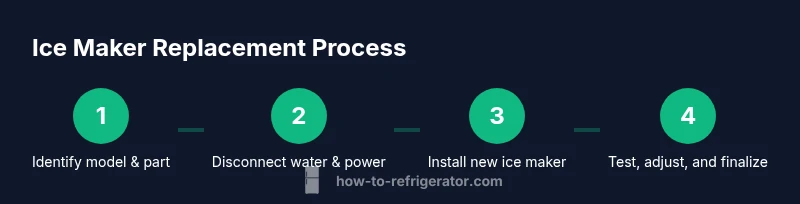
By following these steps, you can replace a faulty Samsung refrigerator ice maker and restore automated ice production. You’ll need model-specific replacement parts, basic hand tools, and access to an electrical outlet and water supply shutoff. According to How To Refrigerator, choose OEM parts and unplug the unit before starting to work. Safety glasses and gloves are recommended.
Why ice maker replacement may be necessary
A Samsung refrigerator ice maker can stop producing ice for several reasons, including a blocked water line, a faulty solenoid, a worn motor gear, or a defective ice-maker module. In many cases, these issues stem from mineral buildup, kinks in the water supply, or loose electrical connections. Replacing the ice maker is often more cost-effective than pursuing an extensive repair, especially when piecewise replacements fail to restore reliable ice production. Before deciding, assess whether water flow reaches the ice maker and whether the ice tray fills consistently. If the unit is still under warranty, check coverage before purchasing parts to avoid unnecessary out-of-pocket costs. This section helps homeowners understand why replacement may be the right move and how to confirm compatibility with their Samsung model. How To Refrigerator analysis notes that OEM parts typically yield better compatibility and long-term reliability. Keep model information handy to ensure you order the correct kit, and always unplug the unit before handling electrical components.
How to identify the correct replacement part
Identifying the right ice maker replacement involves verifying the exact model number of your Samsung refrigerator, the series of the ice maker, and whether your unit uses an integrated ice maker or a freestanding kit. Start by locating the model and serial number inside the fridge or on the rating label. Then, check Samsung’s official parts catalog or a reputable parts supplier for a compatible OEM ice maker kit. Cross-check the connector type, water inlet size, and mounting method to avoid fit issues. If your model shares parts with similar Samsung lines, ensure the replacement is explicitly listed as compatible with your model. How To Refrigerator analysis shows that sticking with OEM parts reduces the risk of misfit and leaks, especially in newer releases where wire harnesses and fittings differ by revision. After selecting the part, review the return policy in case of incompatibility and confirm any required refrigerant handling if the model involves sealed systems.
Tools and safety considerations
Before you begin, unplug the refrigerator and shut off the water supply to prevent accidental shocks or leaks. Wear safety goggles and gloves to protect against sharp edges and splashed water. Keep a dry surface and have towels ready to catch any condensate. Work in a well-lit area and avoid twisting or pulling on hoses that could cause cracks or leaks. Use the proper screwdriver size and keep track of screws and connectors as you remove the old ice maker. If you encounter a stubborn fastener, apply a bit of penetrating oil and let it sit for a moment to avoid stripping the head. This preparation minimizes risk and smooths the replacement process.
Common failure modes and what they imply
No ice production or erratic outputs often point to a blocked water line or a failed ice maker module. Slow ice production can indicate mineral buildup, a clogged fill tube, or a weak motor. Water leaks around the ice maker typically mean a loose water line connection or a damaged inlet valve. Poor ice quality—crushed or hollow cubes—may result from temperature issues in the freezer or a misaligned ice mold. If you notice ice dumps unevenly, inspect the mechanism for wear or misalignment. In many cases, replacing the ice maker kit resolves multiple symptoms, but be sure to rule out the water supply, ice chute, and dispenser components during diagnosis. How To Refrigerator recommends verifying all connections and testing with a controlled setup to confirm the fault before purchasing parts.
How to order and prepare the replacement part
Order a replacement kit that explicitly states compatibility with your Samsung model. Double-check the part number and connector type, then review the installation instructions provided by the supplier. When you receive the kit, lay out every component and compare it to the exploded diagram in the manual to confirm nothing is missing. If your model requires a service bulletin or firmware check for the ice maker, follow those steps first or consult a professional. Prepare the workspace by laying a towel and a shallow pan to catch any residual water and arrange tools in a logical order. Having the correct replacement part ready to install reduces downtime and increases the likelihood of a successful repair on the first attempt.
What to expect after installation and maintenance
After installing the new ice maker, reconnect the water line, plug the fridge back in, and restore the water supply. Give the system time to fill and freeze a batch of ice; this may take several hours depending on the appliance model. Check for leaks around fittings and ensure the ice maker cycles properly with the door closed. If ice cubes appear irregular or the tray doesn’t fill evenly, revisit the mounting and water supply connections for a quick re-tighten. Regular maintenance—like clean water filters, periodic line checks, and preventing mineral buildup—helps extend the life of your ice maker and reduces the likelihood of future failures.
Tools & Materials
- OEM Samsung ice maker replacement kit(Model-specific part; verify exact model number)
- Phillips head screwdriver(PH2 or PH1 depending on screws)
- Flat-head screwdriver(For prying covers if needed)
- Pliers(For clamps and fittings)
- Adjustable wrench(For water line nuts and fittings)
- Gloves(Protect hands from sharp edges)
- Safety goggles(Eye protection during disassembly)
- Towel or small bucket(Catch water during line disconnect)
- Multimeter (optional)(Testing electrical continuity if needed)
Steps
Estimated time: 30-45 minutes
- 1
Power down and prep
Unplug the refrigerator and shut off the dedicated water supply. Clear the surrounding area and assemble your replacement kit. This initial step reduces the risk of electrical shock and water damage during disassembly.
Tip: Take a photo of connectors before removing anything to aid reassembly. - 2
Remove ice maker cover and access old unit
Remove the screws holding the ice maker housing and gently lift the cover to reveal mounting screws and electrical connectors. Note the orientation of any wiring harnesses and keep track of fasteners. Avoid forcing components to prevent damage.
Tip: Keep screws in a labeled container to avoid mix-ups. - 3
Disconnect water line and electrical connection
Carefully loosen the water line nut with an adjustable wrench and disconnect the electrical plug or harness. Place a towel beneath to catch any residual water. Inspect the inlet valve and line for any signs of wear or corrosion.
Tip: If water line is stiff, apply a small amount of penetrating oil and wait a minute before loosening. - 4
Mount the new ice maker
Position the new ice maker in the same orientation as the old one, connect the electrical harness, and secure mounting screws. Reattach the water line with a snug but not overtightened connection. Ensure the unit sits flush with the cabinet for proper operation.
Tip: Use a torque-friendly approach—hand-tighten first, then snug with a tool. - 5
Reconnect power and secure housing
Restore power and reassemble the ice maker housing. Double-check all connections and ensure nothing remains loose. Replace any coverings or grills and wipe away any spills before testing.
Tip: Double-check that the water supply is turned back on only after the water line is securely connected. - 6
Test and finalize
Plug the fridge back in and run a test cycle to confirm ice production. Listen for unusual sounds and check for leaks around fittings. If necessary, adjust the ice maker alignment so the tray fills evenly.
Tip: Allow several hours for a full ice batch to form; initial cycles may have minor abnormalities.
FAQ
Is a Samsung ice maker replacement covered under warranty?
Warranty coverage depends on the original purchase terms and the model’s status. Check the warranty booklet and date of purchase; if still in effect, contact Samsung or the retailer for guidance. Replacement parts may be covered if they were installed under warranty.
Warranty depends on your purchase and terms; check eligibility with Samsung or your retailer.
Can I replace the ice maker myself or should I hire a pro?
Many homeowners can replace an ice maker with the right OEM part and proper safety steps. If you are uncomfortable with electrical connections or water line work, or if your model has complex electronic controls, consider hiring a technician.
You can DIY if you’re comfortable with electrical and water-line work; otherwise, a pro is wise.
How long does it take to replace an ice maker?
A typical replacement takes about 30 to 45 minutes for a straightforward swap, plus extra time for testing and potential minor adjustments. More complex installations may require longer.
Generally about half an hour to an hour, depending on model and access.
Will replacing the ice maker fix a water leakage issue?
If the leak was caused by a faulty ice maker connection or valve, replacement often resolves it. Persistent leaks may indicate a problem upstream in the water line or a damaged valve elsewhere in the system.
Replacement often fixes leaks caused by the ice maker connection; if leaks persist, check the water line and valve elsewhere.
Do I need to empty the ice bin after replacement?
Yes. After replacement, allow time for the system to run and refill. Empty and discard ice that may have formed during the outage, then monitor for any off-flavors or cloudiness.
Yes, discard existing ice and monitor the new batch.
Can different Samsung models use the same ice maker?
Some models share compatible ice maker assemblies, but compatibility is model-specific. Always verify the exact part number and fitment before purchase.
Some models share parts, but always confirm the exact part number for your model.
Watch Video
Top Takeaways
- Verify compatibility with model before purchasing parts.
- Power down and isolate water supply to avoid leaks or shocks.
- Replace with OEM parts for best fit and reliability.
- Test thoroughly and monitor for leaks after installation.
- Regular maintenance extends ice maker life and reduces future failures.