KitchenAid Refrigerator Water Filter Replacement: A Homeowner’s Guide
Learn how to identify, locate, and replace a KitchenAid refrigerator water filter with a clear, step-by-step home repair guide. Includes prepping your workspace, flushing the new filter, resetting indicators, and maintenance tips for optimal water quality.


Goal: Replace a kitchenaid refrigerator water filter, identify the correct model, and verify water flow after installation. You’ll need the right filter cartridge, a clean workspace, towels, and a small tray to catch spills. This guide covers locating the filter, removing the old cartridge, installing the new one, flushing the line, and resetting the indicator if applicable.
Understanding the KitchenAid Refrigerator Water Filter and Why It Matters
The journey to clean, crisp-tasting water in your KitchenAid refrigerator starts with the water filter. The kitchenaid refrigerator water filter is designed to reduce common contaminants, improve taste and odor, and help protect your ice maker from debris that can affect performance. Regular filter replacement is a straightforward maintenance task that pays off with better water quality and a longer-lasting appliance. According to How To Refrigerator, following the manufacturer’s recommended replacement timeline minimizes risk and ensures consistent filtration. Before you begin, gather the right filter, a clean workspace, towels, and a small tray to catch any splashes. A calm, organized setup makes the job quick and reduces the chance of missing a step.
For homeowners, the goal is not only to swap the cartridge but to understand why filtration matters. Clean water protects family health, preserves appliance efficiency, and reduces sediment buildup that can foul the dispenser or ice maker. If you notice a change in water flow, taste, or odor, you may be due for a filter replacement. This guide will walk you through model-agnostic steps that apply to most KitchenAid refrigerators, while noting model-specific nuances.
Brand context: The How To Refrigerator team emphasizes starting with the correct filter model to avoid compatibility issues and leaks. By following a structured approach, you reduce the risk of spills and ensure your water stays safe for drinking and ice production.
Types of Filters Used by KitchenAid Refrigerators and How to Identify Yours
KitchenAid refrigerators typically use cartridge-style water filters that fit within a dedicated housing. These cartridges come in different shapes or orientations depending on the model, but the selection is always model-specific. The most reliable way to identify the right filter is to check your fridge’s user manual or the label on the current cartridge. If the original is not accessible, look inside the refrigerator for a model number or reference the door panel for filter type indicators. Avoid trying filters that are not listed as compatible for your unit, as an ill-fitting cartridge can cause leaks, reduced filtration, or pressure issues. Record the model reference so you can search for an exact match when buying replacements.
In some cases, a model streamlines compatibility by using a single cartridge family across multiple configurations. If your unit is older or part of a different kitchen line, you may see subtle design differences in the filter housing. Always move slowly when removing old filters to prevent water from spurting and to minimize the risk of drips on cabinetry.
From a maintenance standpoint, keeping a small inventory of the correct filters near the fridge helps prevent last-minute trips to the store. If you’re not sure which cartridge you need, consult the user manual, check the current filter for any part numbers, or contact customer support. How To Refrigerator’s guidance is to verify compatibility first and then proceed with installation.
How to Confirm the Right Filter Model for Your Unit
Identifying the correct filter model is the foundation of a successful replacement. Start by checking the fridge’s owner’s manual or manufacturer’s online resources for filter compatibility. If you still have the original packaging, the model number is usually printed on the side or back. Some KitchenAid units display a filter indicator on the control panel that prompts when replacement is due; this is a helpful hint that can narrow your search.
If you cannot locate the manual, remove the current filter and inspect its exterior for a label or etched numbers. Use those identifiers to search the brand’s official site or contact support for a definitive match. Remember that using an incorrect filter can compromise water quality or cause leaks, and that’s not worth the risk. Once you’ve confirmed the model, proceed to gather the correct cartridge and prepare your workspace for a smooth replacement.
Locating the Filter: Where It’s Usually Found on KitchenAid Models
The filter location varies by model, but most KitchenAid refrigerators house the filter in a dedicated housing behind a grille at the front bottom, or inside the refrigerator compartment near the upper-right corner. Some models hide the filter behind a panel in the grille, while others place it inside the crisper drawer area. If you can’t see the housing, consult the owner’s manual or use the model number to pull up model-specific diagrams online. Before touching any components, wipe down the area to keep dust and debris from the fresh filter.
If your fridge has a discreet cap or a twist-off retainer, rotate gently in the correct direction to access the cartridge. Do not force the cap; if it won’t budge, re-check the alignment and refer to the user guide for your exact model. The goal is to reach the cartridge without disturbing other fittings that could cause leaks.
Tools and Prep: What You Need Before You Start
Having the right tools and a clean workspace sets the tone for a hassle-free replacement. Gather a fresh KitchenAid water filter that matches your model, clean towels or microfiber cloths for drips, a shallow tray or pan to catch spills, and the fridge’s user manual or model reference. If your model requires a tool-assisted removal, include a soft cloth for grip and a non-scratch sleeve to protect plastic parts. A small flashlight can help you see inside tight compartments, especially when the filter housing is recessed or behind a panel. Finally, ensure the water supply to the fridge is stable and that the area around the appliance is clear of obstacles so you can work comfortably.
Preparation reduces surprises and makes the replacement safer and more efficient. If you’re unsure about a step, consult your manual or refer to the How To Refrigerator advisory notes for model-specific guidance.
Step-by-Step Overview for Replacement (Non-numbered)
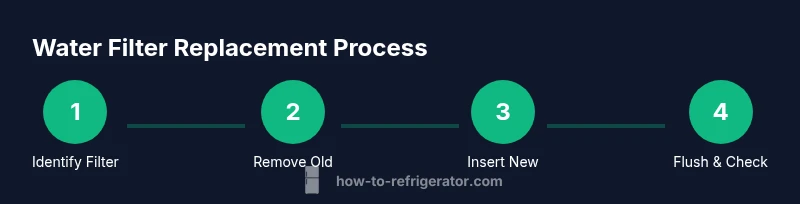
Below is a high-level overview of the replacement process. The detailed, step-by-step instructions follow in the dedicated STEP-BY-STEP block. In general, you will confirm the right filter, prepare the workspace, remove the old cartridge, install the new one in the correct orientation, flush the line to purge air, and reset any indicator if your model supports it. Always perform this task with the water disconnected or the line relieved of pressure to avoid splashes and spills. If you notice any leakage, pause and double-check the housing seal and orientation before continuing.
This overview is designed to keep you oriented as you go into the more granular steps later in the guide.
Priming the New Filter and Checking for Leaks
Priming the new filter is an important step to avoid air pockets and ensure the filter begins filtering as soon as water flows. Remove the new cartridge from its packaging, inspect the O-rings for damage, and rinse the filter as recommended by the manufacturer. Install the cartridge with the correct orientation and reassemble the housing securely. Once installed, dispense water for several minutes to purge air and test for leaks around the housing and along the supply line. If you see any drips, tighten the housing a little more and re-check after a few minutes.
Preventing leaks is easier when you take your time during the seating and sealing process and keep towels handy to manage any drips.
Resetting the Indicator and Verifying Water Quality
Many KitchenAid models include a filter indicator that reminds you when replacement is due. After the new filter is installed and the system has been purged, reset the indicator if your model supports it. Run water through the dispenser and observe for a steady, clean flow. If the water appears cloudy or has an unusual odor, flush longer and consider repeating the priming step or rechecking the filter seating. If issues persist, consult the manual or contact support for model-specific troubleshooting.
Quality verification means clear water, no off-taste, and confident ice production. If taste or clarity doesn’t improve after replacement, re-evaluate filter compatibility and installation alignment.
Maintenance Tips to Extend Filter Life and Ensure Water Quality
To maximize filter life and water quality, replace filters on the recommended schedule, keep a small inventory of the correct filters, and store replacements in a cool, dry place. Regularly inspect the status light or indicator for early warnings, and wipe the housing area to remove dust or grime that could affect fit. Avoid using the dispenser to push out cloudy water during the initial purge; instead, allow the filter to settle and flush naturally. If you notice persistent issues such as unusual tastes, odors, or inconsistent flow, re-check the model compatibility and the installation, and consult the كيف To Refrigerator guidance for best practices. Preventive maintenance is cheaper than replacement and keeps your kitchen running smoothly.
Troubleshooting Common Issues After Replacement
If water flow remains slow, recheck the filter orientation and ensure it’s fully seated. Inspect the housing for cracks or improper sealing and confirm that the water supply valve is fully open. If you encounter leaks around the filter housing, remove and reseat the cartridge, inspect the o-rings for damage, and verify you’re using the correct model. For persistent issues such as air in the line or unexplainable odors, consult the user manual or an appliance technician. The goal is a clean, steady water flow and reliable ice production without leaks or contamination.
Authority Sources & Further Reading
For additional guidance on water filtration and refrigerator water safety, refer to authoritative sources:
- https://www.epa.gov/drinking-water
- https://www.cdc.gov/healthywater/drinking/index.html
- https://www.consumerreports.org/coolers-water-filters/
How To Refrigerator Analysis, 2026, reinforces the importance of using model-compatible filters and following the manufacturer’s replacement schedule to maintain water quality and appliance longevity.
Quick Reference: Model-agnostic Tips
Keep a labeled spare filter on hand, verify model compatibility before purchasing, and follow the exact orientation during installation. Always use towels to manage drips, and never force a cartridge into a housing. If you’re unsure, pause and consult the manual or contact customer support for model-specific instructions.
Tools & Materials
- New KitchenAid water filter(Must match your fridge model)
- Clean towels or microfiber cloths(For catching drips and wiping surfaces)
- Owner's manual or model reference(Helpful for confirming compatibility)
- Soft cloth or sponge(For gentle cleaning of the housing area)
- Gloves (optional)(Protect hands during replacement)
- Small tray or dish(Catch any minor spills during purge)
Steps
Estimated time: 15-25 minutes
- 1
Prepare the workspace
Clear the area around the fridge, lay towels to catch spills, and ensure you have the new filter ready. This reduces surprises and keeps components clean during replacement.
Tip: Have all materials within arm’s reach before you start. - 2
Identify the filter location
Check your model’s manual or look for the filter housing behind the grille or inside the fridge cabinet. Visualize the path from the water line to the cartridge to avoid confusion.
Tip: If you’re unsure, pause and confirm the model reference first. - 3
Open the filter housing
Gently rotate or release the retaining cap to access the cartridge. Be prepared for a small amount of water to escape, so keep towels handy.
Tip: Do not force the cap if it won’t move—double-check alignment. - 4
Remove the old filter
Pull the cartridge straight out from the housing, noting its orientation for the new filter. Inspect the area for any debris that could contaminate the new cartridge.
Tip: Take a photo of the old filter’s orientation if helpful. - 5
Prepare the new filter
Unpack the new cartridge and inspect the O-rings. If your model requires rinsing, do so per the manufacturer’s instructions before installation.
Tip: Check for any protective coverings that must be removed before use. - 6
Install the new filter
Insert the new cartridge in the correct orientation and reseal the housing. Ensure it sits firmly and the housing is securely closed.
Tip: Turn until it is snug and aligned with any alignment marks. - 7
Flush the system
Run water through the dispenser to purge air and contaminants from the new filter. Continue until the water runs clear and steady.
Tip: Keep towels underneath to manage any splashes. - 8
Reset indicators and verify
If your model has a filter indicator, reset it according to the manual. Check for leaks and confirm water flow is consistent.
Tip: Monitor for leaks over the next few minutes to ensure a proper seal.
FAQ
Where is the water filter located on most KitchenAid refrigerators?
Location varies by model. It is commonly behind a grille at the bottom front or inside the fridge near the top-right section. If you can’t locate it, consult the manual or search by your model number for diagrams.
Most KitchenAid fridges hide the filter behind the grille at the bottom front or inside the compartment near the top-right. If unsure, check the manual.
How often should I replace the KitchenAid water filter?
Replacement frequency depends on usage and the model, but many users replace every six months or when the dispenser notice indicates it’s time. Always follow the manufacturer’s guidance for your specific unit.
Most people replace every six months or when the indicator asks you to. Always follow your model’s guidance.
Can I use a non-KitchenAid filter in my KitchenAid fridge?
Using a filter not listed as compatible with your model can cause leaks or poor filtration. Always choose a filter confirmed as compatible with your specific KitchenAid model.
No—use only filters listed as compatible with your model to avoid leaks and poor filtration.
Do I need to run water after replacing the filter?
Yes. Running water after installation purges air and helps flush out loose filters. Continue until the water flow stabilizes and tastes clean.
Yes. Run water until it’s clear and steady.
What should I do if water flow is slow after replacement?
Slow flow can indicate an installation issue or air in the line. Re-check the cartridge orientation and seating, inspect for leaks, and purge the line again.
If the flow is slow, recheck installation and purge the line again.
What tools do I need to replace the filter?
Most replacements require only the new filter and towels; some models may need a soft cloth or non-scratch tool. Always refer to the manual for model-specific requirements.
Usually just the new filter and towels, but check your manual.
Watch Video
Top Takeaways
- Identify the correct filter model before buying.
- Prepare a clean workspace and gather required tools.
- Install with correct orientation and secure the housing.
- Flush, purge air, and reset indicators as needed.