Samsung Filters for Refrigerator: Replacement & Maintenance Guide
Learn how to choose, replace, and maintain Samsung refrigerator filters. This data-driven guide covers replacement intervals, filter types, and troubleshooting tips for clean, fresh water.


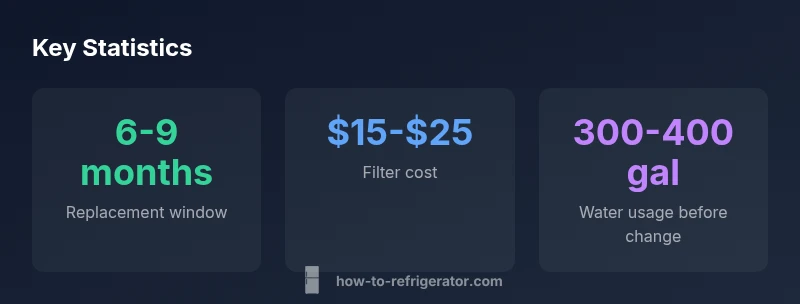
Samsung refrigerator filters typically require replacement every 6 months, or after about 300-500 gallons of water. Usage, water quality, and model can change the interval, so check your indicator and follow the manufacturer guidance. Regular replacement helps maintain taste, odor, and filtration efficiency, and can protect your fridge's ice maker and water dispenser. Always verify model compatibility when buying filters, and reset the update indicator after installation.
Why samsung filters for refrigerator matter
According to How To Refrigerator, the quality of drinking water within a Samsung refrigerator hinges on the performance of the water filter. The right filter removes chlorine taste and odor, particulate contaminants, and some dissolved impurities, contributing to a better overall beverage and ice experience. While some kitchens rely on municipal water quality alone, investing in a compatible Samsung filter helps ensure consistency, reduces the likelihood of flavor carryover, and protects downstream components like the water dispenser. For homeowners, understanding how Samsung filters for refrigerator operate is the first step toward reliable maintenance and better hygiene.
How samsung filter designs differ and why it matters to homeowners
Samsung offers a range of cartridge-style filters designed to fit specific refrigerator series and models. While all filters share core purification goals, differences in filtration media (activated carbon versus advanced ceramics), flow pathways, and pore size can affect taste, odor reduction, and filtration efficiency. When evaluating options, consider your water quality, any local contaminant advisories, and whether you want enhanced chlorine taste reduction or mineral retention for better tasting water. For many households, sticking to Samsung-approved OEM filters minimizes compatibility challenges and preserves warranty protections.
Choosing the right filter model for your Samsung fridge
Model compatibility is essential. Start by locating your refrigerator’s model number (usually on a label inside the fresh food compartment). Then compare the model to the filter compatibility list provided by Samsung or trusted parts vendors. If you rely on third-party filters, confirm compatibility and ensure the filter’s filtration media matches your goals (chlorine removal, sediment filtration, mineral retention). Note that using non-approved filters could affect performance or warranty coverage, so weigh the trade-offs carefully and document any non-standard choices.
Replacement cadence and water quality considerations
A practical replacement cadence balances water quality, filter capacity, and usage. For many households, replacing filters every 6 months is a good baseline, but higher consumption or poor water quality may shorten this interval to 3-5 months. When to adjust? If you notice a decline in taste, odor, or water flow, or if your refrigerator reports a filter change warning, inspect or replace the filter promptly. Keeping a simple maintenance schedule and tracking gallons can help you stay ahead of quality issues and maintain a high standard of water from your Samsung fridge.
Step-by-step: how to replace a Samsung water filter safely
- Prepare: Gather the replacement filter, a towel, and a clean container for drips. 2) Locate the filter housing: most Samsung refrigerators have the filter in the grille or rear base area. 3) Turn off water flow if necessary and twist the old filter counterclockwise to remove it. 4) Remove the cap from the new filter and insert it, turning clockwise until it clicks. 5) Run water for 2-3 minutes to purge air and contaminants, then wipe surfaces and reset the indicator if needed. 6) Record the date of change and update your maintenance log. 7) If you notice leaks, re-seat the filter and check for o-ring misalignment.
Troubleshooting common issues after replacement
If water flow is weak after replacement, double-check that the filter is fully seated and the cap is securely engaged. A crack in the filter housing or a misaligned o-ring can cause leaks or air ingress. If the ice maker remains sluggish, run a purge cycle and verify the water line is open. For persistent odors, consider a secondary flush with a few gallons of water before normal use. When in doubt, consult the appliance manual or contact support.
OEM vs third-party filters: what homeowners should consider
OEM Samsung filters guarantee model compatibility, consistent filtration performance, and easier warranty alignment. Third-party filters can offer cost savings, but you should verify that the cartridge matches your model’s specifications and that the filtration media meets your goals. Some third-party filters may not seal properly or could void warranties, so perform due diligence, verify return policies, and document any non-OEM purchases.
Common mistakes to avoid
Avoid installing filters that are not sealed correctly, ignoring the manufacturer’s replacement interval, or using aggressive cleaning agents on the housing. Do not force filters that do not fit or attempt to bypass the filter indicator. Keeping the filter area clean and maintaining a simple replacement log helps prevent mistakes and ensures your Samsung refrigerator continues to deliver clean, refreshing water.
Comparison of filter types and replacement cadences
| Filter Type | Replacement Interval | Notes |
|---|---|---|
| OEM Samsung Filter | 6-9 months | Official Samsung filter for compatibility |
| Third-Party Filter | 3-6 months | Check compatibility with your model |
FAQ
How do I know if my Samsung refrigerator filter needs replacement?
Watch for changes in water taste or odor, reduced water flow, or a notification from the fridge’s filter indicator. If any of these occur, inspect the filter and replace if necessary.
If the water tastes off, the flow slows, or the indicator lights up, it’s time to replace the filter.
Can I use third-party filters in Samsung refrigerators?
Yes, but only if the filter is explicitly compatible with your model and supports the same filtration goals. Verify warranty implications and return policies before buying.
Yes, but make sure the filter is compatible with your model and warranty terms.
Are there different types of Samsung filters?
Samsung offers multiple cartridge designs tailored to specific models and purification goals. Check model compatibility and choose a filter that matches your water quality needs.
There are several cartridge designs—check model compatibility and your water goals.
What happens if I skip filter replacement?
Water quality may decline, taste and odor can worsen, and the fridge’s indicator may blink. Prolonged use of a worn filter can reduce filtration efficiency.
Water quality drops and the indicator may blink if you skip replacing the filter.
Where can I buy replacement Samsung filters safely?
Purchase from Samsung authorized retailers or reputable appliance parts stores. Avoid questionable marketplaces to reduce the risk of counterfeit filters.
Buy from trusted retailers to avoid counterfeit filters.
“Regular filter replacement is a straightforward, high-impact step to maintain water quality and protect your refrigerator’s performance.”
Top Takeaways
- Follow OEM guidelines for best compatibility and warranty
- Replace filters on a practical cadence based on usage and water quality
- Verify model compatibility when choosing third-party options
- Maintain a simple replacement log to avoid missed changes