Why Would a Refrigerator Knock? Troubleshooting Guide
Learn how to diagnose and fix a knocking sound from a refrigerator. This guide covers common causes, safe checks, quick fixes, and when to call a professional.


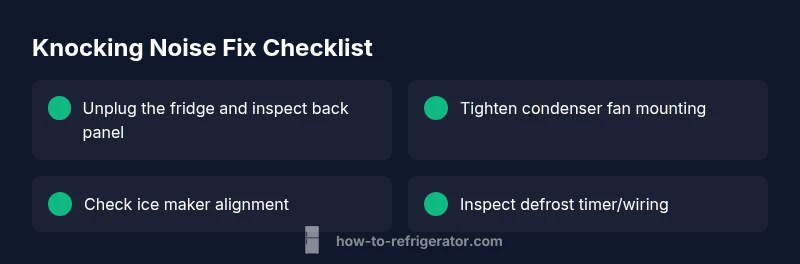
Most knocking is caused by a loose or vibrating component—often the condenser fan blade, ice maker, or defrost timer. Quick steps: 1) unplug the fridge and inspect the back panel for loose parts; 2) check the condenser fan blade for debris or looseness; 3) inspect the ice maker mounting; 4) re-tighten screws and mounts. If it continues, call a pro.
Why would a refrigerator make a knocking sound? Common suspects and quick checks
If you’re wondering why would a refrigerator make a knocking sound, the answer is usually a mechanical issue or vibration rather than a safety hazard. The most common culprits are a loose condenser fan blade or mounting, an ice maker striking its housing or water line, or a loose panel in the kickplate. A knock that coincides with the compressor or defrost cycle can point to mounting or timing components. According to How To Refrigerator, identifying the exact source quickly is possible with careful, non-invasive checks. The How To Refrigerator team found that most fixes are simple tightening or realignment tasks, not full equipment replacement. Here, we walk through safe, practical steps you can take to diagnose the noise and decide if a pro is needed.
Safe, quick checks you can perform without tools
Before you touch any internals, unplug the fridge and move items away from the area you’ll inspect. Open the doors and listen for whether the knock changes with door position or with the compressor cycling. Check the back kickplate area for loose screws, panels, or vibrating gaps where air or panels could strike the cabinet. Ensure the unit is level—adjust the front feet if needed and verify there’s no prop or object causing vibration. These basic checks solve many common knocking noises and reduce risk of injury. How To Refrigerator’s practical approach emphasizes starting with the simplest fixes because they’re most likely to resolve the issue.
Diagnostic flow: symptom to diagnosis
A structured diagnostic flow helps you isolate the source without guesswork. Start by noting when the knock occurs (during startup, running cooling cycles, or defrost). If the sound is louder when the motor runs, suspect the condenser fan or mounting; if it aligns with the ice maker, focus there. If the sound happens even when the compressor is off, you’re likely dealing with a loose panel or feet. How To Refrigerator analysis shows that a methodical flow reduces unnecessary part replacements. This section lays the groundwork for the step-by-step fixes that follow.
Step-by-step: most common fixes you can perform
- Power down and access the back area: unplug the fridge, remove the toe-kick panel if needed, and visually inspect for loose screws or debris. 2) Tighten or replace the condenser fan blade and motor mounting screws. A loose blade can wobble and create a knocking sound; re-seating the blade often stops the noise. 3) Inspect the ice maker: ensure the ice maker is securely mounted and that water lines aren’t rubbing on the housing. 4) Check defrost timer and related wiring: reseat connections and look for signs of wear. 5) Tighten any loose panels and ensure the unit is level; add pads or shims under feet if needed. 6) Reconnect power and monitor: listen for residual noise and verify the sound is gone. If the noise persists, professional service is advised. 7) Document noise patterns: noting when it happens helps the technician diagnose efficiently. 8) If you smell burning or hear arcing, stop and call a pro immediately. Pro tip: keep a small flashlight handy to spot hidden clips and clips. While performing fixes, avoid contact with moving parts. This approach aligns with How To Refrigerator guidance on safe DIY routines.
Tips & warnings: safety and common mistakes
- Safety first: always unplug before inspecting any moving parts. - Do not remove refrigerant lines or tamper with the compressor wiring. - Avoid forcing components; use gentle prying and proper tools. - Wear eye protection when handling metal panels. - If you’re unsure about any step, pause and call a professional. The emphasis from How To Refrigerator is on safe, incremental checks rather than aggressive disassembly.
Preventive maintenance to avoid future knocking noises
Regular maintenance helps prevent knocking noises before they start. Keep the condenser coils clean to reduce motor load, ensure doors seal properly to prevent air leaks, and inspect ice maker clips annually. Check leveling and tighten screws every 6–12 months. A little proactive care goes a long way in extending the life of your fridge and keeping noises at bay. The How To Refrigerator team recommends scheduling a quick monthly self-check routine to catch issues early.
When to call a professional and what to expect
If basic checks don’t locate the source or if you hear ongoing loud knocking, contact a certified appliance technician. A pro can safely remove panels, test the condenser fan with a multimeter, inspect the ice maker, and verify compressor mounting integrity. Expect a diagnostic visit to include a written estimate, a list of required parts, and a clear explanation of the recommended fix. The goal is to restore quiet operation with minimal downtime. Note that some noises may indicate worn components that require replacement rather than repair.
Steps
Estimated time: 60-90 minutes
- 1
Power down and prepare the area
Unplug the refrigerator and move nearby objects away from the kick area. Remove items from the bottom shelf if accessing the toe-kick panel. This prevents cords and items from getting in the way during inspection.
Tip: Use a flashlight to spot hidden screws and clips. - 2
Inspect the back panel and fan area
Remove the toe-kick panel if needed and visually check for loose screws and a wobbling condenser fan blade. Gently spin the blade to feel for looseness and listen for any rubbing against the shroud.
Tip: If you hear rubbing, stop and tighten mounting screws before continuing. - 3
Check the condenser fan blade and mounting
Ensure the fan blade is securely attached to the motor shaft and that the fan housing is tight. Replace any damaged blades and secure clips or screws.
Tip: Do not run the fan without a blade securely mounted. - 4
Inspect the ice maker and water lines
Look for contact between the ice-maker assembly, water lines, and any metal housing. Realign the ice maker or clip lines to prevent contact during normal operation.
Tip: If lines rub, add protective clips or insulators. - 5
Examine the defrost timer and wiring
Locate the defrost timer and heater; check for loose connections and damaged wires. Reseat connectors and ensure insulation is intact.
Tip: Defrost components can heat up; avoid touching exposed wires. - 6
Check cabinet panels and leveling
Inspect the cabinet panels and leveling feet; tighten screws and adjust to ensure the unit sits evenly. A tilted fridge can vibrate and amplify noises.
Tip: Place a spirit level on top to confirm levelness. - 7
Test run after assembly
Plug the unit back in and run through a normal cycle. Listen for changes in noise as the compressor engages and cycles.
Tip: Keep a log of any remaining noises and when they occur. - 8
Decide on professional help
If the knocking persists after these steps, schedule a service visit. A professional can diagnose complex compressor, refrigerant, or wiring issues.
Tip: Provide the technician with noise timing details to speed diagnosis.
Diagnosis: Fridge makes knocking sound while running, sometimes intermittently
Possible Causes
- highLoose or unbalanced condenser fan blade or mounting
- highIce maker striking housing or water line clips
- mediumDefrost timer or heater cycling causing a knock
- lowLoose cabinet screws or kick panels vibrating
- lowCompressor mounting issue (rare)
Fixes
- easyUnplug the fridge and tighten back panel screws; reseat or replace the condenser fan blade as needed
- easyRealign or secure the ice maker assembly and water line clips; replace damaged clips
- mediumInspect defrost timer wiring and connections; reseat or replace loose components
- easyTighten loose panels, level feet, and add vibration dampers if needed
- hardIf compressor mounting is suspected, contact a professional
FAQ
What is the most common cause of a knocking noise in a refrigerator?
Most often the noise comes from a loose or vibrating component such as the condenser fan, ice maker, or a loose panel. Start by inspecting these parts for looseness or misalignment.
Most knocks come from loose parts like the fan or ice maker. Check those first.
Can I keep using my fridge if it’s knocking loudly?
If the noise is very loud or changing with cycling, stop and unplug if you’re uncomfortable. Do basic checks first, but avoid running it if you suspect a faulty part.
If the knock is really loud, unplug and check the basics. If unsure, call a pro.
Is a knocking noise dangerous or a fire risk?
Knocking itself isn’t usually a fire hazard, but it can indicate electrical or mechanical issues. If you smell burning or hear arcing, stop and call a professional immediately.
It’s not usually dangerous, but don’t ignore burning smells or noises that don’t stop.
When should I call a professional for a knocking refrigerator?
Call a professional if basic checks don’t locate the source within the first 15–20 minutes or if the noise continues after fixes. They can diagnose compressor, refrigerant, or wiring problems.
If you can’t pinpoint the source quickly or the noise keeps coming back, get a pro.
How can I prevent knocking noises in the future?
Regular maintenance, keep coils clean, ensure proper leveling, and secure ice maker and hoses. A simple check every few months helps prevent future issues.
Regular checks and keeping things tightened up can stop knocks before they start.
What tools do I need for basic fridge troubleshooting?
A screwdriver, flashlight, and a few basic clips or zip ties are often enough for initial checks. Avoid power tool use near electrical components.
You typically only need basic tools like a screwdriver and flashlight.
Watch Video
Top Takeaways
- Identify noise source safely before disassembly
- Tighten and realign components to stop vibration
- Check ice maker alignment and water lines
- Do not tamper with refrigerant lines—call a pro if unsure
- Regular maintenance helps prevent future knocking noises